Omnidirectional stereo (ODS) is a projection model for stereo 360-degree videos.
It is designed for VR viewing with a head-mounted display (HMD).
More information here.
For fun I developed and tested an approach for ray tracing with the open-source POV-Ray software.
How to render
Currently (2016-03-11), rendering an ODS image requires an alpha version of POV-Ray that supports a user_defined camera. Download from here
Or use my POV-Ray fork. More on that below.
With official POV-Ray (Alpha),
use the following code for an ODS top-bottom layout (left eye on top, right eye on bottom):
// ODS Top/Bottom - Docs: /posts/omnidirectional-stereo-ods-with-pov-ray/
#declare odsIPD = 0.065; // Interpupillary distance
#declare odsVerticalModulation = 0.2; // Use 0.0001 if you don't care about Zenith & Nadir zones.
#declare odsLocationX = 0;
#declare odsLocationY = 0;
#declare odsLocationZ = 0;
#declare odsHandedness = -1; // "-1" for left-handed or "1" for right-handed
#declare odsAngle = 0; // Rotation, clockwise, in degree.

camera {
  user_defined
  location {
    function { odsLocationX + cos(((x+0.5+odsAngle/360)) * 2 * pi - pi)*(odsIPD/2*pow(abs(sin(select(y, 1-2*(y+0.5), 1-2*y)*pi)), odsVerticalModulation))*select(-y,-1,+1) }
    function { odsLocationY }
    function { odsLocationZ + sin(((x+0.5+odsAngle/360)) * 2 * pi - pi)*(odsIPD/2*pow(abs(sin(select(y, 1-2*(y+0.5), 1-2*y)*pi)), odsVerticalModulation))*select(-y,-1,+1) * odsHandedness }
  }
  direction {
    function { sin(((x+0.5+odsAngle/360)) * 2 * pi - pi) * cos(pi / 2 -select(y, 1-2*(y+0.5), 1-2*y) * pi) }
    function { sin(pi / 2 - select(y, 1-2*(y+0.5), 1-2*y) * pi) }
    function { -cos(((x+0.5+odsAngle/360)) * 2 * pi - pi) * cos(pi / 2 -select(y, 1-2*(y+0.5), 1-2*y) * pi) * odsHandedness }
  }
}
Use the following code for ODS side-by-side:
// ODS Side-by-Side - Docs: /posts/omnidirectional-stereo-ods-with-pov-ray/
#declare odsIPD = 0.065; // Interpupillary distance
#declare odsVerticalModulation = 0.2; // Use 0.0001 if you don't care about Zenith & Nadir zones.
#declare odsLocationX = 0;
#declare odsLocationY = 0;
#declare odsLocationZ = 0;
#declare odsHandedness = -1; // "-1" for left-handed or "1" for right-handed
#declare odsAngle = 0; // Rotation, clockwise, in degree.

camera {
  user_defined
  location {
    function {  odsLocationX + cos(((select(x,2*(x+0.5),2*x)+odsAngle/360)) * 2 * pi - pi)*(odsIPD/2*pow(abs(sin((1-(y+0.5))*pi)), odsVerticalModulation))*select(x,-1,1) }
    function {  odsLocationY }
    function {  odsLocationZ + sin(((select(x,2*(x+0.5),2*x)+odsAngle/360)) * 2 * pi - pi)*(odsIPD/2*pow(abs(sin((1-(y+0.5))*pi)), odsVerticalModulation))*select(x,-1,1) * odsHandedness }
  }
  direction {
    function {  sin(((select(x,2*(x+0.5),2*x)+odsAngle/360)) * 2 * pi - pi) * cos(pi / 2 -(1-(y+0.5)) * pi) }
    function {  sin(pi / 2 - (1-(y+0.5)) * pi) }
    function {  -cos(((select(x,2*(x+0.5),2*x)+odsAngle/360)) * 2 * pi - pi) * cos(pi / 2 -(1-(y+0.5)) * pi) * odsHandedness }
  }
}
Use the following code for single-eye rendering:
// ODS Single Eye - Docs: /posts/omnidirectional-stereo-ods-with-pov-ray/
#declare odsIPD = 0.065; // Interpupillary distance
#declare odsVerticalModulation = 0.2; // Use 0.0001 if you don't care about Zenith & Nadir zones.
#declare odsLocationX = 0;
#declare odsLocationY = 0;
#declare odsLocationZ = 0;
#declare odsHandedness = -1; // "-1" for left-handed or "1" for right-handed
#declare odsAngle = 0; // Rotation, clockwise, in degree.
#declare odsEye = -1; // -1 for Left eye, +1 for Right eye

camera {
  user_defined
  location {
    function {  odsLocationX + cos(((x+0.5+odsAngle/360)) * 2 * pi - pi)*(odsIPD/2*pow(abs(sin((1-(y+0.5))*pi)), odsVerticalModulation))*odsEye }
    function {  odsLocationY }
    function {  odsLocationZ + sin(((x+0.5+odsAngle/360)) * 2 * pi - pi)*(odsIPD/2*pow(abs(sin((1-(y+0.5))*pi)), odsVerticalModulation))*odsEye * odsHandedness }
  }
  direction {
    function {  sin(((x+0.5+odsAngle/360)) * 2 * pi - pi) * cos(pi / 2 -(1-(y+0.5)) * pi) }
    function {  sin(pi / 2 - (1-(y+0.5)) * pi) }
    function {  -cos(((x+0.5+odsAngle/360)) * 2 * pi - pi) * cos(pi / 2 -(1-(y+0.5)) * pi) * odsHandedness }
  }
}
Caveats
- Camera direction is not actually supported. It is always look_at<0,0,1>. You can use the odsAngle parameter for a rotation (in degrees) around the Y axis.
- Zenith & Nadir Zones
The base ODS algorithm has spirals/singularities toward the zenith and nadir points. To avoid that, I modulate the stereoscopic eye separation so that it starts at normal eye separation near the horizon and is smoothly decreased, reaching zero by the time either the zenith or nadir points on the polar axis are visible to the user, producing a monoscopic image.I use this formula:
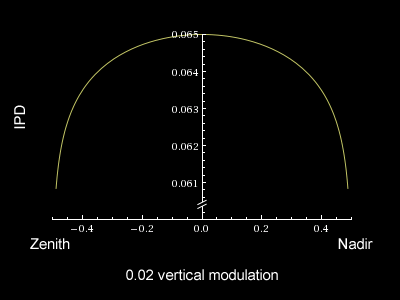
where 0.02 is the odsVerticalModulation and 0.065 the default IPD. Play with this value to see how IPD is reduced near the zenith (x:-0.5) and nadir (x:0.5).
In general it is recommended to avoid objects at the zenith and nadir points, and to use an odsVerticalModulation near 0 (0.0001), to get a perfect IPD / 3D effect.
If you have objects at the zenith and nadir points, using an odsVerticalModulation near 1 can be a good compromise.Other approaches:
Domemaster3D (shader for 3ds Max, Maya, Softimage, etc.) recommends a texture to reduce the effect. linkSolid Angle/Arnold uses a mixed approach. link
Another kind of modulation: link
Best practice
- Objects should remain at least 60cm from the camera (relative to an IPD of 6.5cm).
Use this POV-Ray code to check (it auto-adapts based on IPD):sphere { <odsLocationX,odsLocationY,odsLocationZ>, 0.6*odsIPD/0.065 pigment { color <1,0,0> filter 0.97 } hollow } - Objects appearing directly above or below the camera should remain at least 3.5m from the camera (relative to an IPD of 6.5cm).
- Antialiasing is extremely important on a VR headset.
Recommended Resolutions
I recommend, at least for the current (year 2016) generation of VR headsets (Gear VR, Oculus Rift, HTC Vive), at least 6480 × 6480 pixels in top/bottom for static images. For videos, see below.
Resolution must have a 2:1 aspect ratio (standard equirectangular), which becomes 4:1 for side-by-side or 1:1 for top-bottom.
TL;DR;
It is difficult to estimate a good resolution.
VR headsets apply lens distortion, and every headset can have different lenses, FOV, panel resolution, etc.
The Gear VR, for example, has a 90° FOV on a 2560×1440 panel, but the centre pixel covers 0.06° after distortion. This value is sometimes called “pixel coverage”, “pixel density”, “pixels per display pixel” or “eye buffer scaling”. So for the Gear VR, 0.06° per pixel means we need 360/0.06 = 6000 pixels to cover one monoscopic turn.
Rendering Animation/Video
This is problematic in practice.
In theory the resolution must be at least as explained above for images.
Any VR headset requires a high frame rate to avoid nausea.
- Oculus Rift DK2 (Development Kit 2): 75 FPS
- Oculus Rift CV1 (Consumer Version 1): 90 FPS
- HTC Vive: 90 FPS
- Sony Playstation PSVR : 120 FPS
In general, future-generation VR headsets are expected to need 120 FPS.
But H.264 does not have any level/profile compatible with this kind of resolution.
HEVC/H.265 has the same problem.
We also need a codec that is hardware-accelerated to reach the high FPS required, and generally only H.264/H.265 are optimised for that.
VR Players
Virtual Desktop – There is no option for side-by-side vs top-bottom; it simply detects it from the aspect ratio: 4:1 for side-by-side, 1:1 for top/bottom.
Neither player can play high-resolution H.265 videos.
My POV-Ray fork on GitHub
With a POV-Ray build from my fork, you can simply use a spherical camera:
camera
{
  spherical
  //ipd 0.065
  ods 4
  //ods_angle 0
  //ods_modulation 0.2
  //ods_handedness 1
  location <0,0,0>
}
- ods: 0 for monoscopic image, 1 for left eye only, 2 for right eye only, 3 for side-by-side, 4 for top/bottom. 0 is the default; 4 is recommended.
- Other parameters ipd, ods_angle, ods_modulation and ods_handedness match the user_defined approach parameters described above.
Interesting Links
- POV-Ray newsgroup, topic about the approach
- POV-Ray newsgroup, topic about contents
- Oculus Forum Topic
- Renderman/Pixar approach
- Bernie Roehl POV-Ray approach
- Blender approach
- Scott Singer approach
Kudos
Many, many thanks to:
Christoph Lipka, William F Pokorny, Jaime Vives Piqueres from POV-Ray newsgroup.
Joan from Oculus Forum.
Jakob Flierl (check out his GitHub repo about ODS).
Examples of rendering
Some rendering examples (6480 × 6480 pixels, top-bottom).

——————
Stacker Day – POV-Ray sample scene adapted for ODS

——————
Fractals 1 – POV-Ray sample scene adapted for ODS

——————
Fractals 2 – POV-Ray sample scene adapted for ODS

——————

Wineglass – POV-Ray sample scene adapted for ODS
——————

Axis – test reference
I also rendered a sample video that can be used for stress-testing VR video players.
QUICKRES.INI
Reference resolutions for POV-Ray quickres.ini:
[ODS TB Quick Test - 512 x 512]
Width=512
Height=512
Antialias=Off

[ODS TB Test - 1024 x 1024]
Width=1024
Height=1024
Antialias=Off

[ODS TB Minimum - 3600 x 3600]
Width=3600
Height=3600
Antialias=On
Antialias_Threshold=0.3

[ODS TB High - 6480 x 6480]
Width=6480
Height=6480
Antialias=On
Antialias_Threshold=0.3

[ODS TB Ultra - 12288 x 12288]
Width=12288
Height=12288
Antialias=On
Antialias_Threshold=0.3

[ODS TB 1440p - 2560 x 1440]
Width=2560
Height=1440
Antialias=On
Antialias_Threshold=0.3

[ODS TB UHD-1 2160p - 3840 x 2160]
Width=3840
Height=2160
Antialias=On
Antialias_Threshold=0.3

[ODS TB DCI 4K - 4096 x 2160]
Width=4096
Height=2160
Antialias=On
Antialias_Threshold=0.3

[ODS TB 8K UHD - 7680 x 4320]
Width=7680
Height=4320
Antialias=On
Antialias_Threshold=0.3

[ODS LR Minimum - 7200 x 1800]
Width=7200
Height=1800
Antialias=On
Antialias_Threshold=0.3

[ODS LR High - 12960 x 3240]
Width=12960
Height=3240
Antialias=On
Antialias_Threshold=0.3

[ODS LR Ultra - 24576 x 6144]
Width=24576
Height=6144
Antialias=On
Antialias_Threshold=0.3
[ODS LR Low - 7200 x 1800]
Width=7200
Height=1800
Antialias=On
Antialias_Threshold=0.3

[ODS LR Normal - 12960 x 3240]
Width=12960
Height=3240
Antialias=On
Antialias_Threshold=0.3

[ODS LR High - 24576 x 6144]
Width=24576
Height=6144
Antialias=On
Antialias_Threshold=0.3

[ODS TB Low - 3600 x 3600]
Width=3600
Height=3600
Antialias=On
Antialias_Threshold=0.3

[ODS TB Normal - 6480 x 6480]
Width=6480
Height=6480
Antialias=On
Antialias_Threshold=0.3

[ODS TB High - 12288 x 12288]
Width=12288
Height=12288
Antialias=On
Antialias_Threshold=0.3

[ODS TB YouTube - 3840 x 2160]
Width=3840
Height=2160
Antialias=On
Antialias_Threshold=0.3